Get Started
This page runs the full stack on one machine with Docker. It uses the llm-d simulator in place of vLLM, so you do not need a GPU or a Kubernetes cluster.
The simulator returns canned text. It is for trying the wiring, not for measuring performance. For a real cluster, see Run on Kubernetes.
Run it locally
You need Docker with Compose and OpenSSL. Run the commands below in the same terminal.
Get the example
The example/ directory contains the Compose file, LiteLLM config and router configs.
git clone https://github.com/BerriAI/inference-stack-landing-page.git
cd inference-stack-landing-page/example
Start the stack
Generate a key for this local session, then start the containers:
LITELLM_MASTER_KEY="sk-$(openssl rand -hex 32)" &&
  export LITELLM_MASTER_KEY &&
  docker compose up -d
The key stays in your terminal environment and the LiteLLM container configuration. Do not paste it into source files or share docker compose config or container inspection output. Compose refuses to start without a key.
This starts four containers. The published ports accept connections only from your machine; the router and metrics endpoints do not require authentication. Keep them local.
| Container | Role | Port |
|---|---|---|
litellm | Gateway | 4000 |
envoy | llm-d router entry point | 8081 |
epp | llm-d endpoint picker, chooses the replica | 9090 (metrics) |
vllm-sim | Stand-in for vLLM | internal |
Send a request through LiteLLM
OpenAI format:
curl localhost:4000/v1/chat/completions \
  -H "Authorization: Bearer $LITELLM_MASTER_KEY" \
  -H 'Content-Type: application/json' \
  -d '{"model": "demo-model", "messages": [{"role": "user", "content": "hi"}]}'
Anthropic format, which is what Claude Code uses:
curl localhost:4000/v1/messages \
  -H "x-api-key: $LITELLM_MASTER_KEY" \
  -H 'anthropic-version: 2023-06-01' \
  -H 'Content-Type: application/json' \
  -d '{"model": "demo-model", "max_tokens": 20, "messages": [{"role": "user", "content": "hi"}]}'
Check that llm-d saw the team
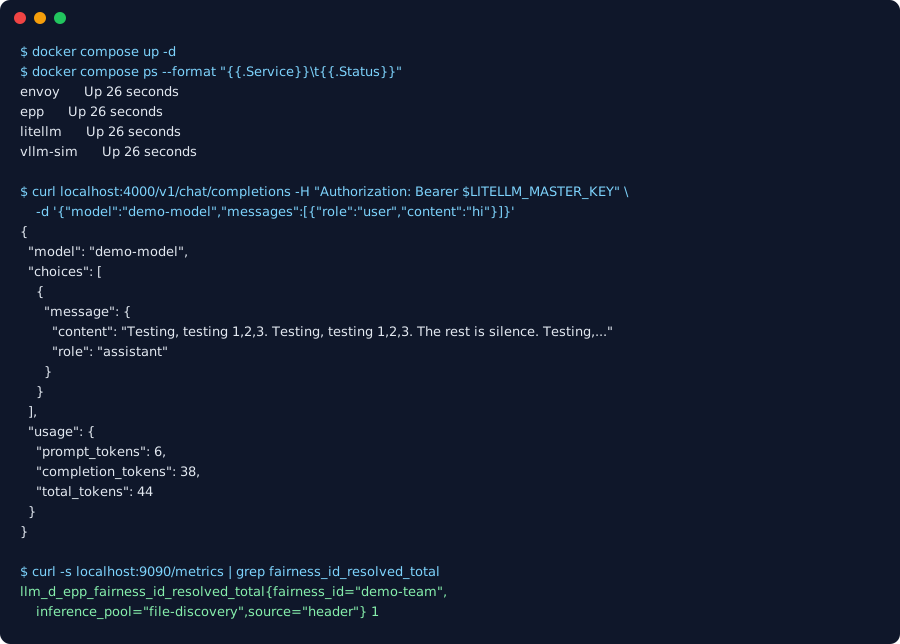
curl -s localhost:9090/metrics | grep fairness_id_resolved_totalYou should see a line with fairness_id="demo-team" and source="header". That is llm-d reading the header LiteLLM set.
Example output from the simulator; the command shows an environment variable in place of the key.
Stop it
docker compose down
unset LITELLM_MASTER_KEY
Keep the same terminal open until you stop the stack. If you lose the key, run the start command again to generate a replacement and recreate LiteLLM before sending requests.
How LiteLLM sets the headers
The example sets fixed headers on the model in litellm-config.yaml.
model_list:
  - model_name: demo-model
    litellm_params:
      model: hosted_vllm/demo-model
      api_base: http://127.0.0.1:8081/v1
      api_key: none
      extra_headers:
        x-llm-d-inference-fairness-id: demo-team
        x-llm-d-inference-objective: standard-traffic
Fixed headers give every caller the same tenant, which is enough to see the wiring but not enough for real fairness. To send each caller’s own team, add a LiteLLM callback that reads the team from the authenticated key.
from litellm.integrations.custom_logger import CustomLogger


class LlmdHeaders(CustomLogger):
    async def async_pre_call_hook(self, user_api_key_dict, cache, data, call_type):
        data["extra_headers"] = {
            **(data.get("extra_headers") or {}),
            "x-llm-d-inference-fairness-id": user_api_key_dict.team_id or "no-team",
            "x-llm-d-inference-objective": "standard-traffic",
        }
        return data


llmd_headers = LlmdHeaders()litellm_settings:
callbacks: llmd_hook.llmd_headersPriority bands need Kubernetes today. The objective header names an InferenceObjective, which is a Kubernetes resource. In this local setup llm-d queues by the fairness header and treats every request as priority 0.
Run on Kubernetes
For real traffic, install llm-d and vLLM with the llm-d guides, then put LiteLLM in front.
- Install llm-d and vLLM with the optimized baseline guide.
- Turn on tenant fairness and priority bands with the flow control guide.
- Install LiteLLM in front with the llm-d LiteLLM guide.
- Check the result with llm-d-validate.